Proforma
Developed by: CreativEngine in close collaboration with Senate committees; initially developed with Senate Foreign Relations Committee (SFRC) and continually enhanced through committee-driven requirements, supported by the Sergeant at Arms (SAA) on Senate infrastructure.
Used by: 12 Senate Committees, ~500 users
Public link: N/A
Contact: support@creativengine.com
Proforma is a highly configurable, comprehensive legislative workflow management platform for Congressional committees that handles meeting scheduling, amendment tracking, nomination processing, document management, and committee communications in a single integrated system.
The platform originated with Senate Foreign Relations Committee staff seeking to improve management of committee workflows. SFRC engaged CreativEngine, a Los Angeles-based web design and development firm. From 2012 to 2014, CreativEngine and the committee attempted to accomplish the workflows within SharePoint's technical constraints before deciding to develop a custom solution in 2015. In 2020, Proforma was officially added to the Senate Innovations contract as part of an SAA initiative to modernize committee and office workflows. Today, Proforma is used by twelve Senate committees.
Functionality
Proforma consists of eight integrated modules designed to manage the complete lifecycle of committee operations:
Mail: Tracks incoming official correspondence
Classified: Manages metadata, storage, and chain of custody for classified documents
Meetings: The most extensive module, handling everything from notices to agenda items to votes
QFRs (Questions for the Record): Tracks the post-hearing question and response process
Nominations: Monitors who is file-complete and where nominees are in the confirmation process
Directory: A utility module that serves as the committee's address book, tracking interactions across time even as names and job titles change
Portal: A separate, Member-office-facing interface with carefully controlled access
Settings: Manages membership lists and configurations, with some sections available only to developers
The mail module was Proforma's first application, designed to track incoming correspondence and distribute it efficiently. The module handles incoming official mail with a straightforward workflow: documents are entered with metadata, categorized, and then compiled into daily roundup emails that go out to committee and personal office staff. The committee uses this data to track what reports are outstanding from the Executive branch, state or federal agencies, and other reporting bodies.
Classified
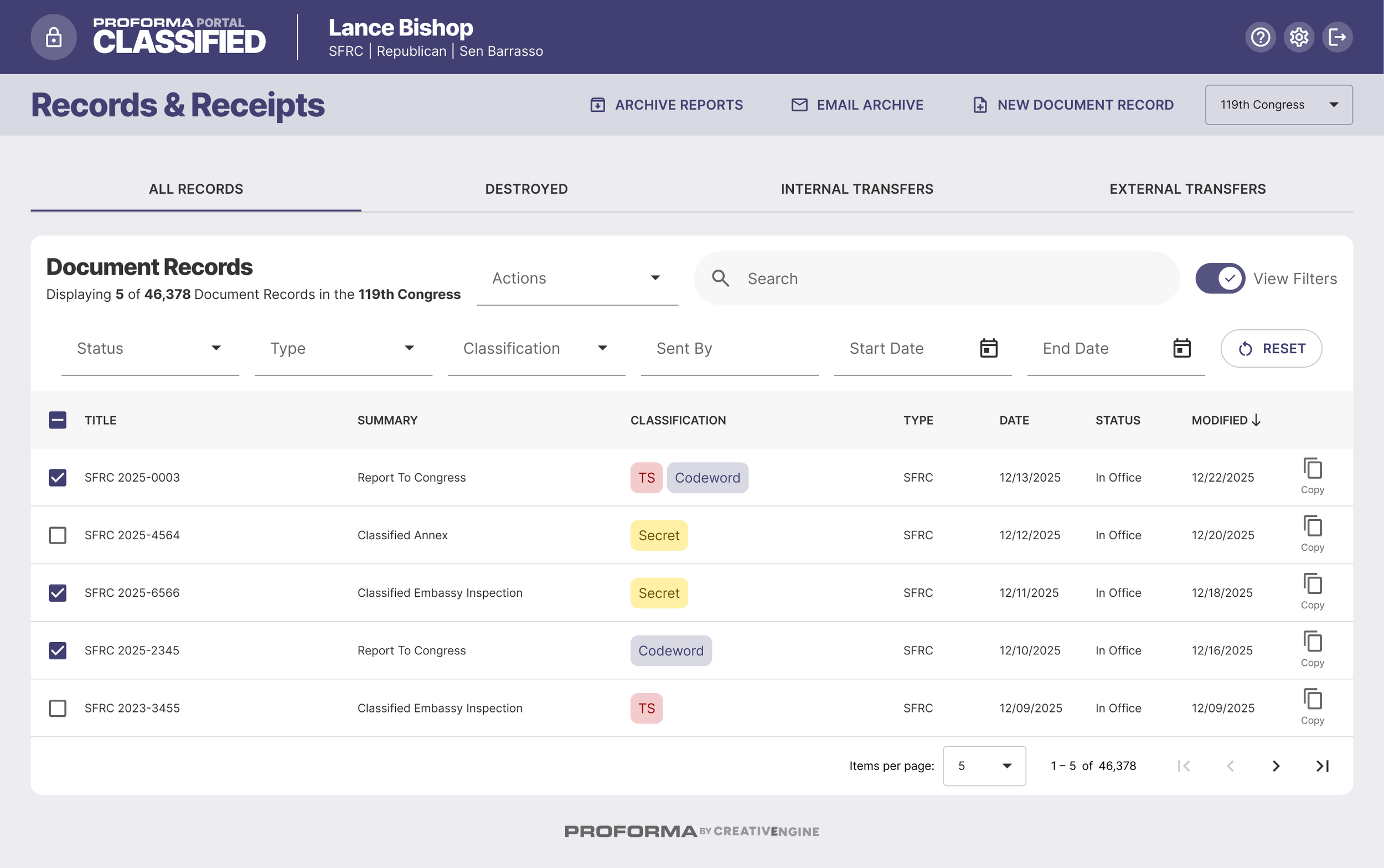
The classified module handles the specialized workflow of classified document management, tracking materials through their entire lifecycle: from receipt, through Senate Security, to storage in committee vaults or SCIFs (Sensitive Compartmented Information Facility), to eventual transfer to the National Archives or destruction. Staff can download cover sheets, track when documents are transferred in and out, and manage the chain of custody.
The classified module includes barcode scanner capability that enables bulk document processing. Staff reported that this functionality was particularly useful for addressing the backlog of documents following the pandemic. Committee staff can easily aggregate files for archive reports, enter box information, and track it in a central repository for easy reporting.
Meetings
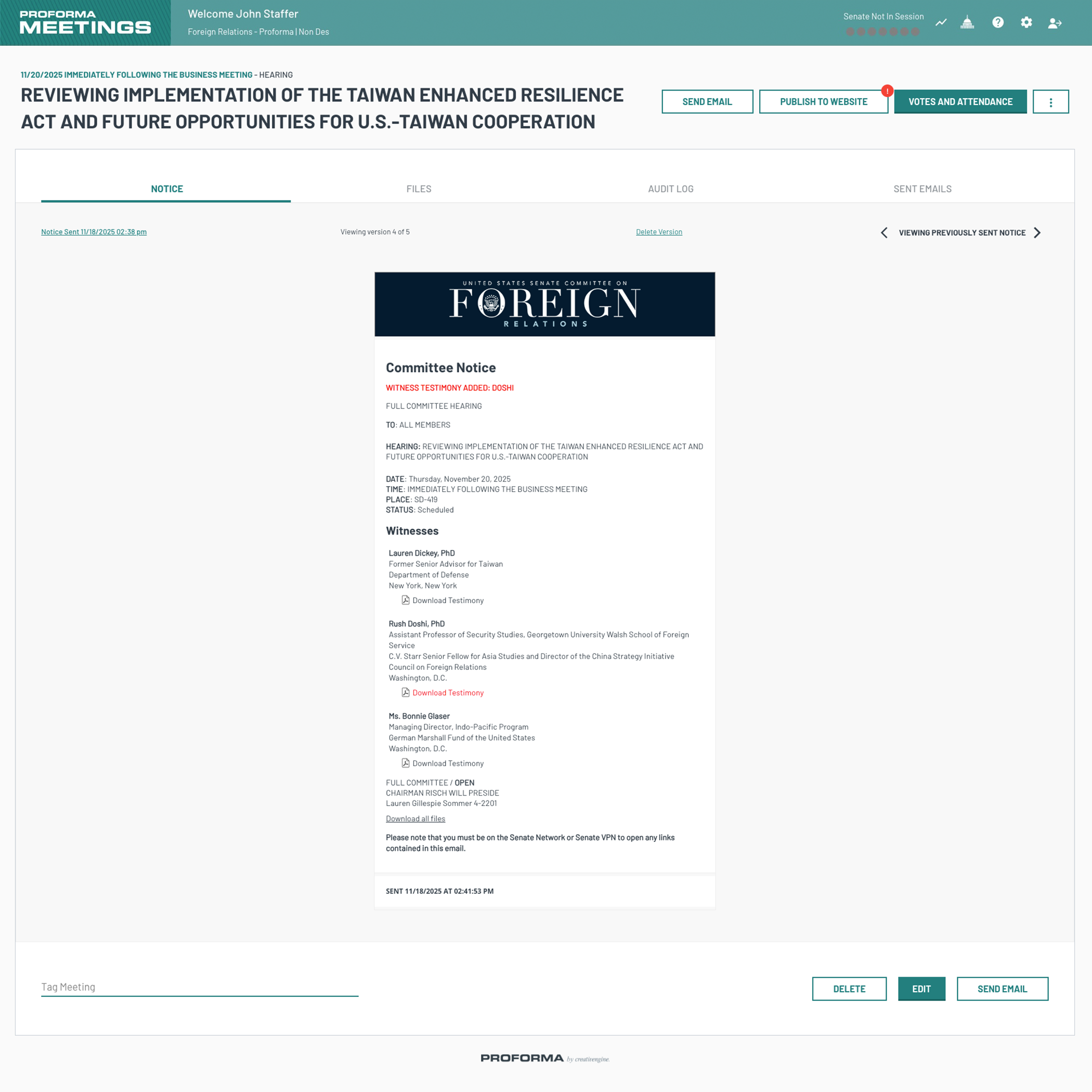
The meetings module was initially designed as a notice-clearing application for coordinating changes between majority and minority staff. When committees expressed a preference to continue using email for this function, the module evolved to integrate with email and provide centralized tracking and management of meeting notice changes. Committees can set up customized email templates for associated notices, amendment deadline reminders, results of a business meeting, etc.

For a typical business meeting, committee staff can manage:
Logistics: Basic information like title, date, time, location, and unstructured text for additional context
Members and Staff: Who's attending, who's presiding, and relevant contact information
Legislation: Bills and amendments being considered, with integration to Congress.gov
Amendment Deadlines: Including the ability to set alternate deadlines so different pieces of legislation in the same meeting can have different submission deadlines
Nominees: Pulled directly from the nominations app (see below)
Treaties: Tracked separately for reporting reasons, but similar to legislation
Foreign Service Lists: For relevant committees
Agenda Notes: An unstructured text field for any additional information that needs to be displayed on the notice
Agenda Items: Things that can be voted on but don't fit other categories (like subcommittee assignments, committee rules, or subpoenas)
The Meetings module is configurable for the specific workflows of individual committees, allowing for customization that accurately captures a committee’s meeting and hearing information in their preferred style and syntax.
When a meeting notice is updated, changes automatically appear in red with strikethroughs for removed text. The module can then publish directly to committee websites, integrating with both Proforma's own CMS and WordPress.
The system also allows for bulk file upload, allowing staff to upload hundreds of amendments at once for a large markup. “If the files are named in a standardized way, you're able to just upload 300 amendments and the system will automatically put them in the correct format and relate everything correctly,” one staffer explained.
During meetings, the module helps track both attendance and speaking order, with customization for how different committees handle seniority and speaking protocols. The system can also be configured to show different quorum requirements.
For after the meeting, votes are recorded with full detail – roll calls, poll votes, voice votes, or unanimous consent – and results appear in the system. Proforma can easily aggregate data to capture Member’s attendance records for committee meetings. Access to this data is limited to requests from personal offices of that Member. See an example report here.
Questions for the Record (QFRs)
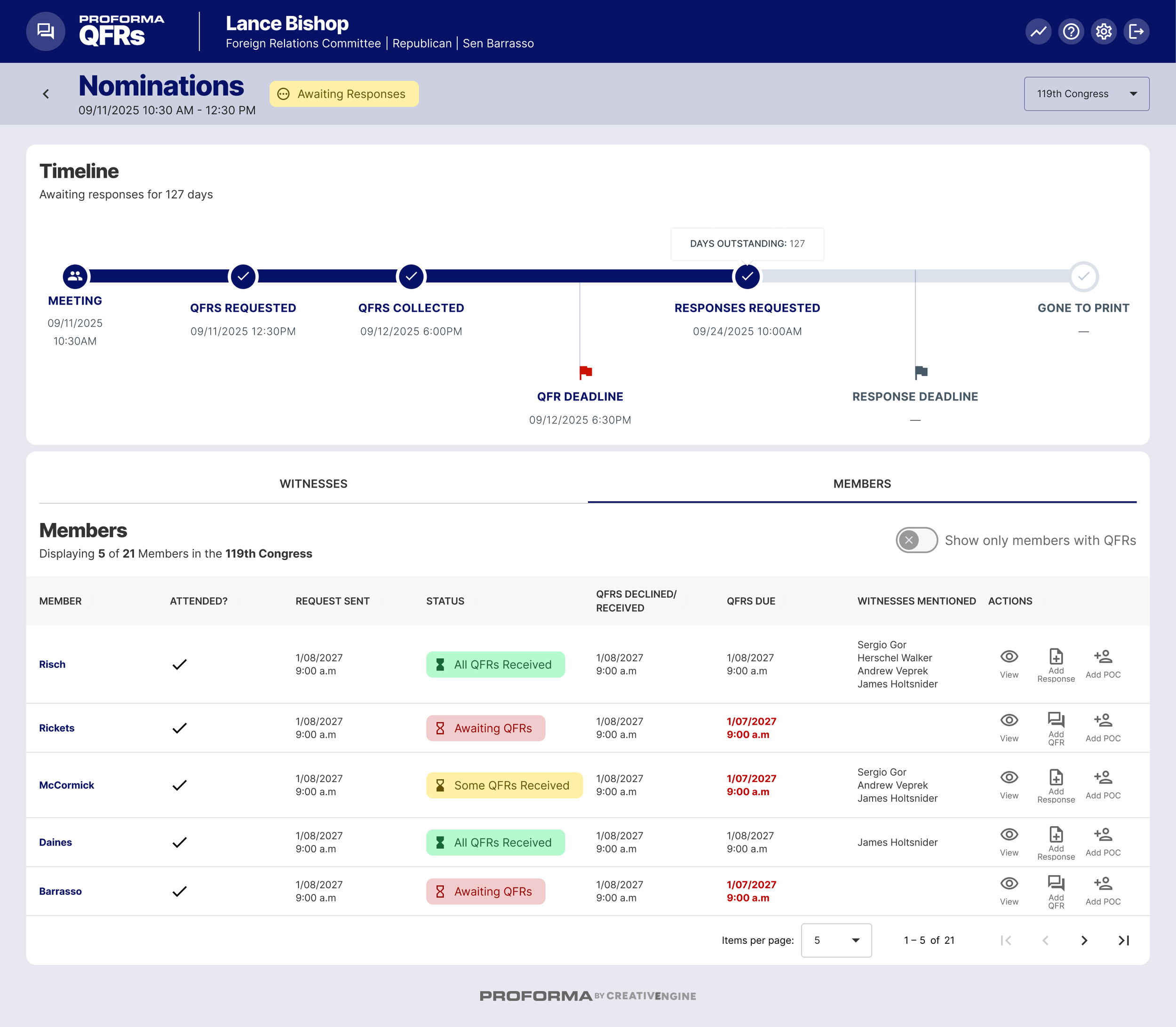
After hearings, the QFRs module tracks the process of collecting questions from Members and responses from witnesses. It imports meetings from the Meetings module and provides a configurable timeline that can automatically set deadlines for question and response submission (e.g., “always two days after the meeting at 5 PM”).
The system integrates with the meeting attendance sheet to show which Members attended and therefore might submit questions. Staff can track whether Members have submitted questions, plan to submit, or have declined. Entering questions as text makes them fully searchable and allows automatic generation of formatted Word documents to send to witnesses.
To track witness responses, the module displays outstanding responses, shows how long committees have been waiting, and flags overdue responses in red. The module can also create spreadsheet reports showing all hearings, who asked questions to whom, who still owes responses, and who has submitted.
Nominations
For committees that handle nominations, Proforma includes a nominations module with Congress.gov integration. Committees can choose automatic imports or manual import by Presidential Nomination number, which gives staff more control over how the nomination is initially entered.
Once nominees are in the system, the overview dashboard gives committees a high-level view of their entire portfolio: how many total positions they manage, what percentage are filled, and how many nominees are at each step of the process. The dashboard breaks this down by current Congress, previous Congress, and earlier – relevant for tracking five-year terms.
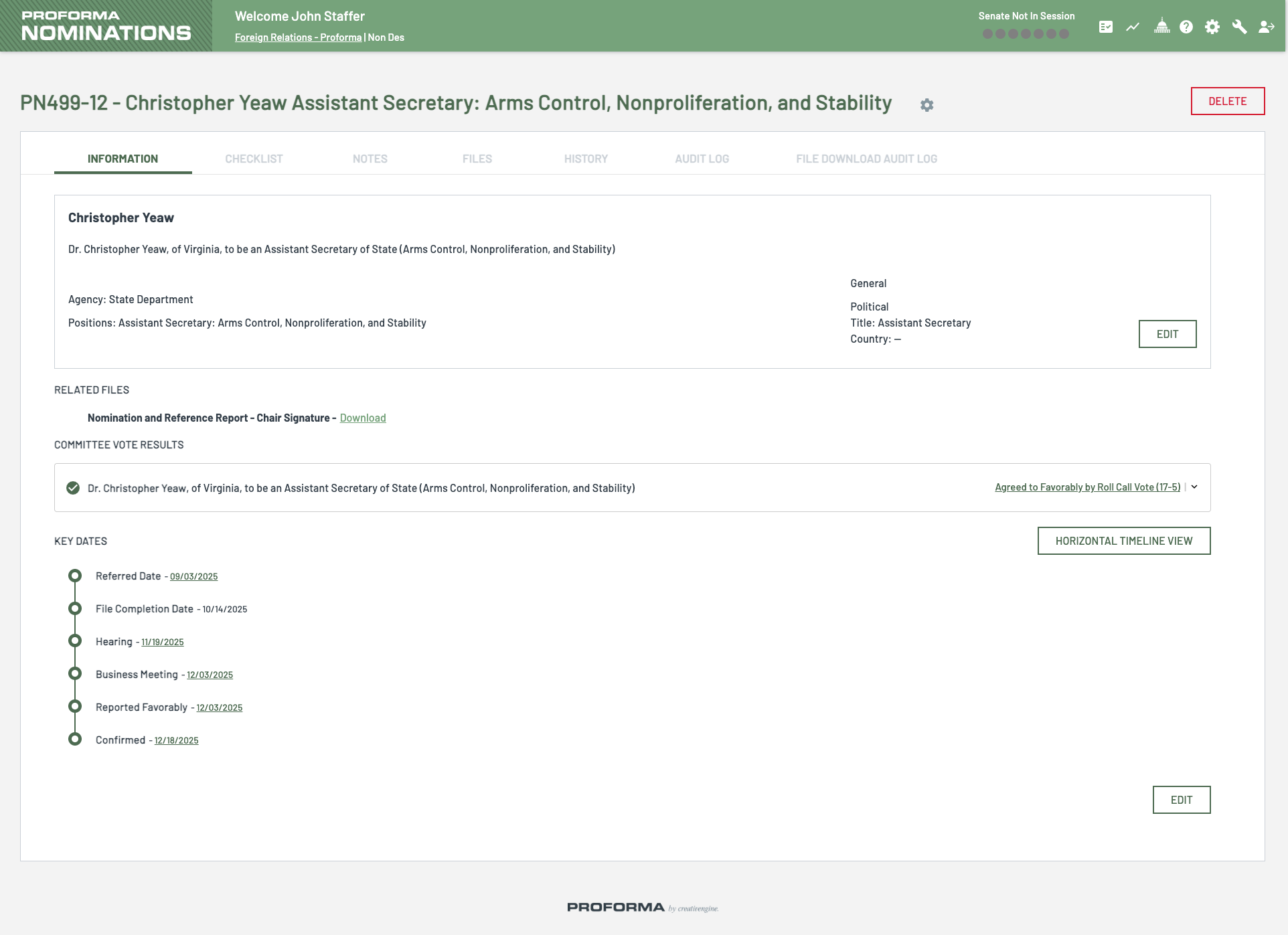
Committees can also view position-level data showing how many spots are available for each specific position, current fills, most recent confirmations, and the full history of past nominees who have held that position.
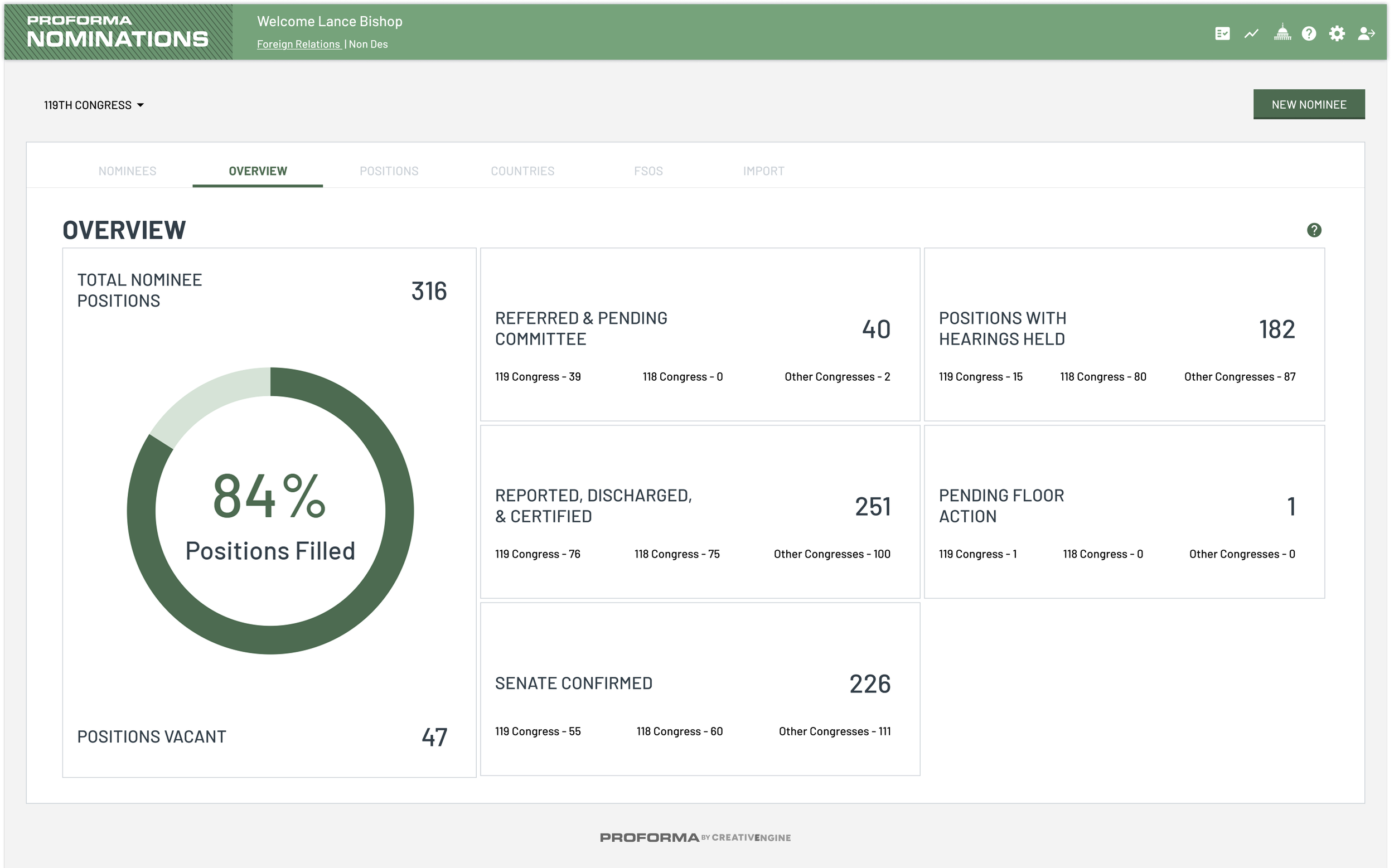
At the individual nominee level, the system becomes a comprehensive file management tool. For each person, staff can track:
Checklist: Paperwork status (necessary, optional, or complete) toward file completion, with automatic updates as documents are added
Notes: For internal tracking of important information
Files: A flexible area for uploads, organized folders, and automatically pulled-in files from meetings – "one place for everything relevant to them"
History: Past nominations if the person has been nominated multiple times and for what positions
Audit Log: Every action taken and every file downloaded
Directory
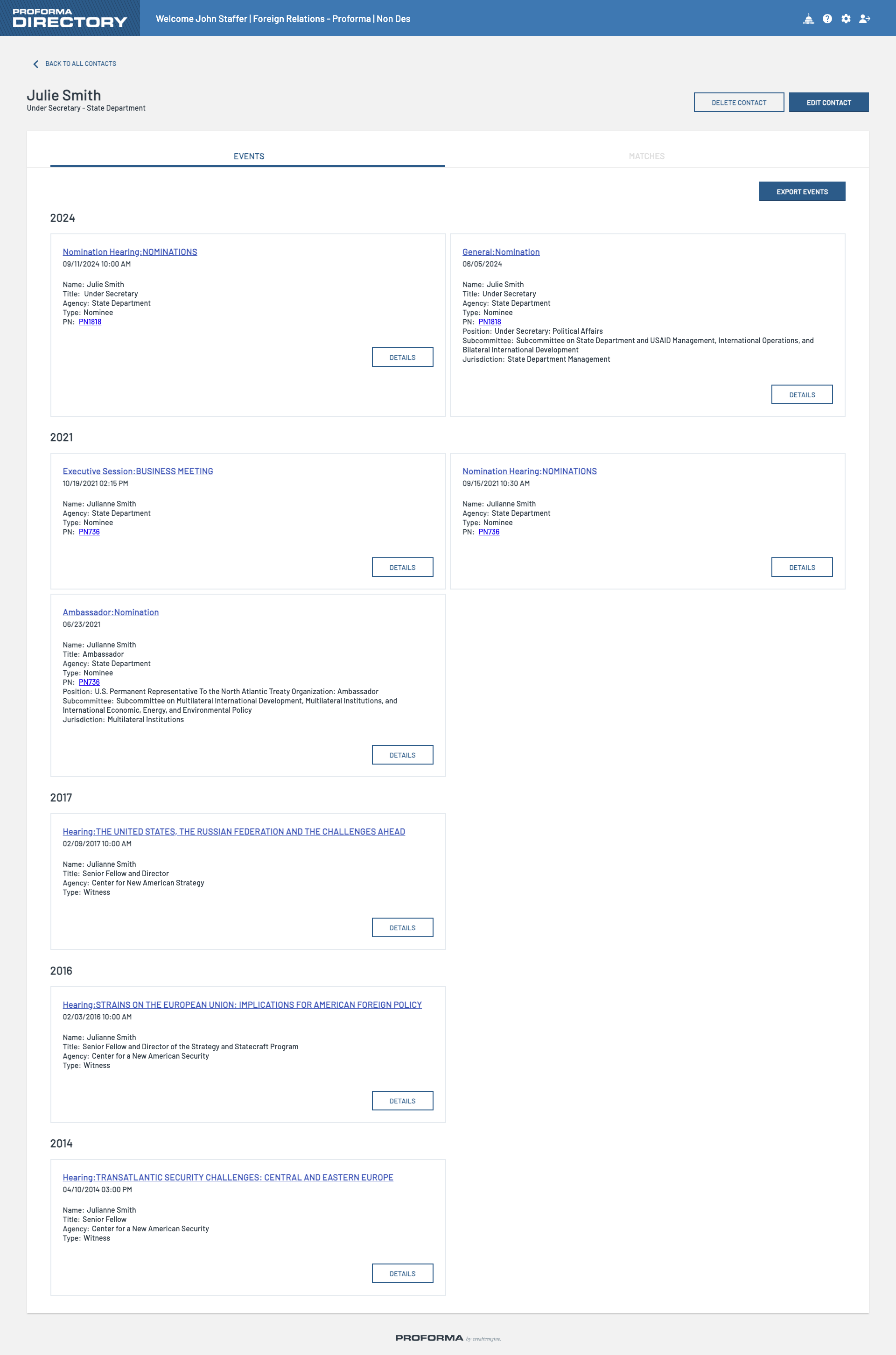
The directory module maintains a comprehensive address book that tracks all interactions with the committee over time, even as people's names, titles, and roles change. Currently, directory entries are committee-specific; if someone testifies before multiple committees, each committee only sees that person's interactions with them.
“The great example for the utility of directory is someone like Hillary Clinton, where she was Hillary Rodham, and then Hillary Rodham Clinton, and so her name has changed over time. Her role, of course, has changed a lot over time, but you're still able to track back to the same person across all of those changes.”
Portal: Member Office Access
While the main Proforma applications are for committee staff, the Portal module provides Member office staff with an interface for their specific needs. It runs on a separate codebase with its own login.
The Portal shows limited information in comparison to what committee staff see. Through the Portal, Member office staff can:
View meeting notices and page through previous versions
Access meeting files (if granted permission)
View limited nominee information with links to Congress.gov
See mail received by the committee and download associated files
Browse “similar documents” for research purposes
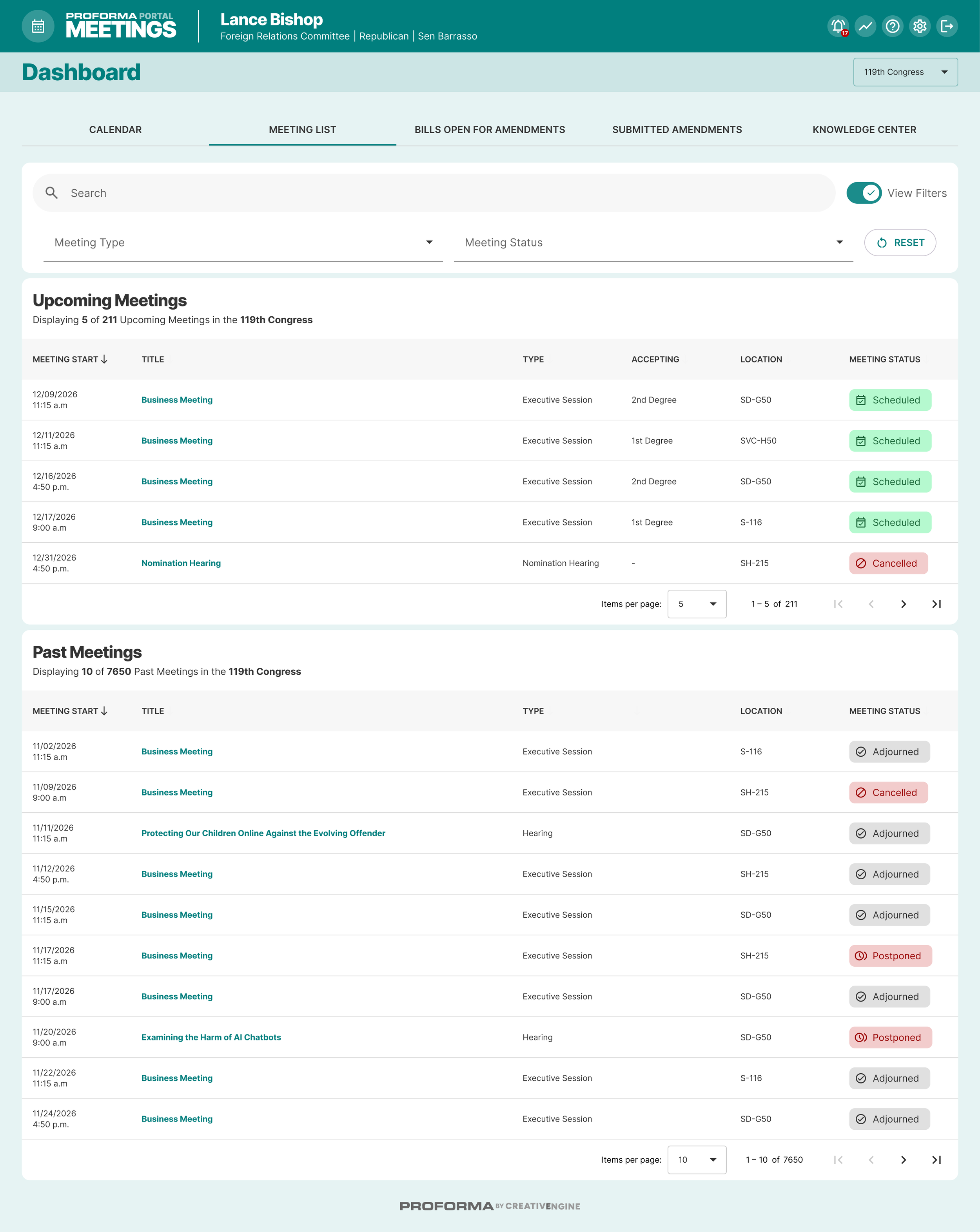
“All of the permissions, especially for the portal, are very granular, so you're able to just give people exactly what they need – nothing more and nothing less,” explained one developer.
Development Considerations
Proforma's adoption across twelve Senate committees with substantially different workflows reflects deliberate design principles that prioritize flexibility, security, integration, and responsiveness.
Flexibility
The central challenge in developing legislative software is variation – each committee has different workflows, terminology, and requirements. Proforma addresses this through deep customization. SFRC alone has approximately 150 preferences configured for their specific instance, controlling everything from which fields appear to what terminology is used.
The system's configurability extends across operational differences. Committees that do not manage second-degree amendment deadlines have those fields hidden entirely from their interface. Proforma accommodates different speaking order protocols across committees, including seniority-based, arrival-based, or custom approaches. These variations are managed while maintaining standardized, structured data on the backend for reports and archiving.
“With how different committee processes can be, having the ability to fully customize is so necessary,” explained one of the lead developers. “It's really helped drive adoption. It can be so challenging to get committees to switch from a workflow they're used to, that they've been doing for years, to something new.”
The system evolves through responsive development. Support emails go to the entire CreativEngine team and Congressional staff report receiving answers in minutes. When Senate leadership suddenly changed nomination voting procedures mid-session, the development team worked with committees through a few calls to implement the changes. The approach is iterative: solve the immediate problem first, then build the long-term solution into the software. Over a decade, this approach has refined the system to address edge cases and operational details that surface only through sustained use.
Security
Proforma runs entirely on Senate infrastructure managed and supported by the SAA. Originally, each committee’s Proforma ran on its own physical servers, but at the beginning of COVID, the SAA provided access to centralized infrastructure, allowing CreativEngine to consolidate everything onto shared servers. Each of the twelve committees has its own completely separate database and login, ensuring data segmentation and security.
Integration
Proforma integrates with existing committee systems to maintain security while supporting staff workflows:
Congress.gov for automatic import of nominee information and legislation data
Senate Active Directory for login integration and access control
Microsoft Graph API for sophisticated Excel-based reports with interactive capabilities
Amend (CreativEngine’s custom CMS) and WordPress for direct publishing from Proforma to public websites
Senate Legislative Call System, the special light indicators for real-time status displays
These integrations connect existing committee systems while reducing manual data entry. The active directory integration enables single sign-on access and tracks individual user activity for audit purposes. Committees can manage their own mailing lists and access groups directly through the active directory integration without vendor involvement.
ProForma's centralized data structure also benefits entities beyond committee staff. The Congressional Research Service can access agency reports as they are submitted to committees rather than waiting for public posting. Senate archivists receive structured data exports at the end of each Congress instead of requiring committee staff to manually compile information from scattered documents and spreadsheets. This process previously required weeks of effort from both committee staff and archivists.