
Download (PDF)
Introduction
State legislators and their offices manage a vast amount of institutional knowledge ranging from past statements, constituent service procedures, policy memos, and oversight records to agency correspondence and budget documents. A Custom Bot built through an institution-approved platform (such as ChatGPT+, Claude, Gemini, or Copilot) can serve as a secure, AI-powered research assistant tailored to that office’s unique needs, drawing exclusively from a curated set of internal resources.
For example, staff can use a Custom Bot to quickly find information about a Member’s past positions, press releases, or hearing remarks, or to support oversight work by querying past agency letters or guidance documents. Staff handling constituent services can reference standard operating procedures or training manuals without searching through shared drives.
By grounding the bot in a trusted resource bank and limiting it from pulling information from outside sources, offices can ensure relevance, accuracy, and security, streamlining operations and supporting more effective governance.
What is a Custom Bot?
A Custom Bot is a customized version of a Large Language Model (LLM) that can be tailored by a user to perform specific tasks, follow custom instructions, and draw information from a select set of uploaded documents. Unlike a standard, commercially available version of an LLM, a Custom Bot responds using only the documents you provide it. This customization makes Custom Bots powerful tools for detail-oriented research, internal knowledge management, oversight, staff onboarding, and more.
Many commercially available LLMs offer paid subscribers the ability to build these tools, though each use a different name
ChatGPT (OpenAI): Custom GPTs or Projects
Claude (Anthropic): Projects
Gemini (Google): Gems
Copilot (Microsoft): Agents (not to be confused with AI agents or agentic AI)
Rather than walking through the steps for any single platform, which may change as these tools evolve, this guide covers the general approach that applies across all of them, along with a tip for getting up-to-date setup instructions from the platform itself.
Before You Start
Review your institution’s official guidance regarding the use of GenAI tools.
Collect all relevant documents you want your bot to use, ideally in .pdf, .docx, or .txt format, and save these as a folder on your desktop where they are easy to navigate to.
Only include publicly available or non-sensitive documents. Never upload classified information, constituent data, PII, or internal strategy documents.
Building a Custom Bot
1. Using a paid subscription account of an approved LLM, sign into your account.
2. Find the custom assistant builder. Look for options labeled “Custom GPTs,” “Projects,” “Gems,” or “Agents” depending on your platform. This is typically accessible from the main sidebar or account menu.
3. Name and describe your assistant. Give it a clear name and describe its purpose. The more context you provide, the better it will be configured for your needs.
4. Upload your resource bank. Add the documents you want your bot to draw from. Most platforms allow up to 20 files. After upload, your bot will be able to read and reference these files.
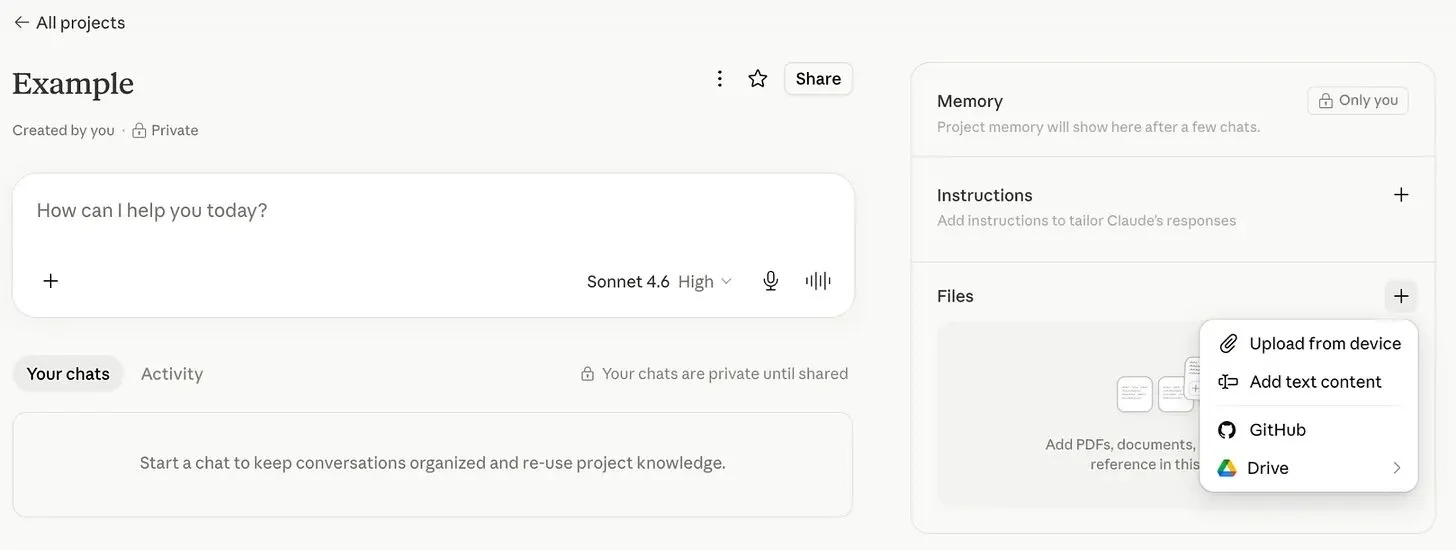
A screenshot of the dashboard to create a Claude Project.
Tip #1: It is important to name files clearly (e.g., Oversight_Investigative_Report_June_2025.pdf).
Tip #2: Avoid scanned image-based PDFs unless they’re OCR-enabled (i.e., the text is selectable).
5. Set your bot’s Instructions. Bots are extremely customizable so it’s important to be intentional about how you would like the one you’re creating to review information, organize content, and present it back to you and other users.
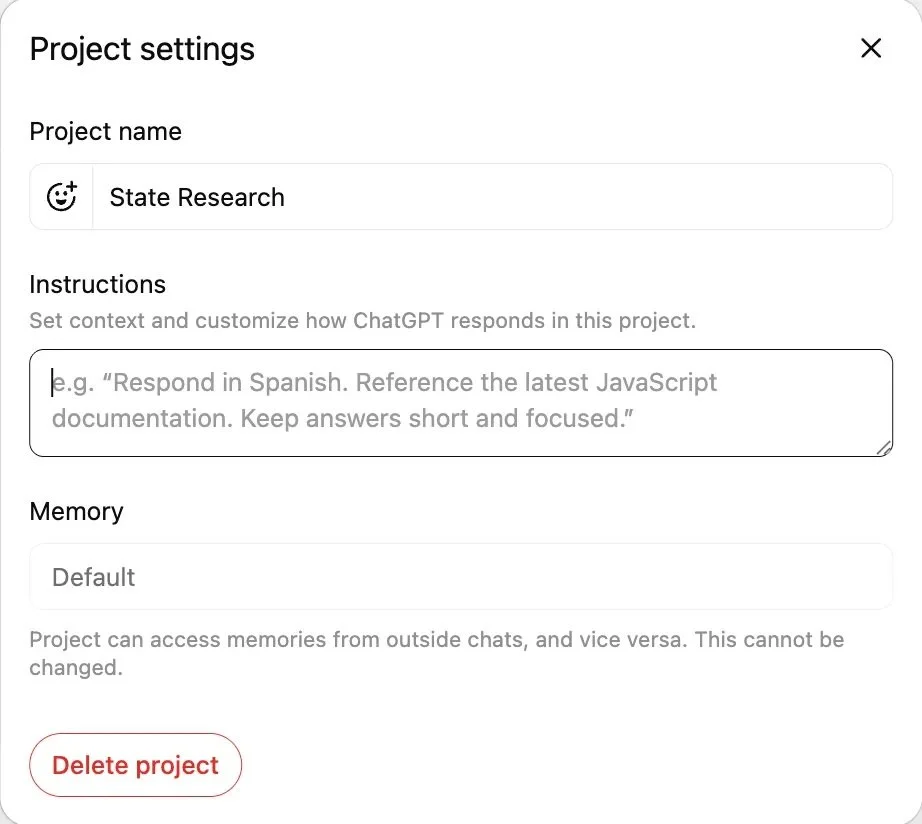
A screenshot of the ChatGPT dashboard to create a CustomGPT or Project.
Restricting Bot Responses to Only Source From the Uploaded Files
In the “Instructions” box, set the behavior with this suggested guidance:
“You are a legislative assistant for a state legislator in [state]. Use only the documents uploaded to you to answer questions. Do not use outside knowledge, and do not guess. If a question cannot be answered based on the documents provided, respond with: ‘I do not have that information based on the current resource bank.’ If the answer is not found in the provided documents, reply: ‘I don’t have information about that based on the documents provided.’”
Instruct the Bot on Personality “Tone”
In the “Instructions” box, set the tone of your Bot’s responses with this suggested guidance:
“Respond as a professional and neutral research assistant for a state legislator in [state].”
Tip: You can also set additional tone specifications, such as levels of formality or brevity.
6. Publish your Custom Bot. Choose whether you want to keep your Custom Bot private (default) or share it with others on your team.
Tip: Not sure where to find these settings in your specific platform? Ask the LLM directly. You can prompt it with something like:
“I use [platform]. Can you give me step-by-step instructions for setting up a custom bot where I can upload my own documents and restrict it to only answering from those documents?”
The platform will walk you through its current interface, which is especially useful since these tools update frequently.
Best Practices for Legislative Use
Follow all institutional guidance and review it often for updates.
Redact all sensitive information before uploading documents.
Use version control to ensure the resources are up to date. Note the upload date/version of each document. Your bot provided information will only be as recent and accurate as the documents it has been provided to pull from.
Train your team on how to use and interpret answers from a Custom Bot. Know that all bots have the potential to hallucinate and that you and your team are ultimately responsible for the information and content that you use. AI-generated content should undergo human review to be fact-checked, and edited to match your office’s opinions and voice.
Tip: When you’ve first created a Custom Bot, test its accuracy with sample queries to ensure it doesn’t hallucinate or pull from general knowledge.
About POPVOX Foundation
POPVOX Foundation is a 501(c)3 nonpartisan nonprofit organization with a mission to help democratic institutions keep pace with a rapidly changing world. Through publications, events, prototypes, and technical assistance, the organization helps public servants and elected officials better serve their constituents and make better policy.
Learn more at popvox.org or contact us at info@popvox.org.